
Shaghaf Chat - شغف شات
shaghaf ChatCommunication
3.65.00 Reviews
- Version
- 1.4.1
- Installs
- 10.00K
- Age Rating
- Teen
Screenshots


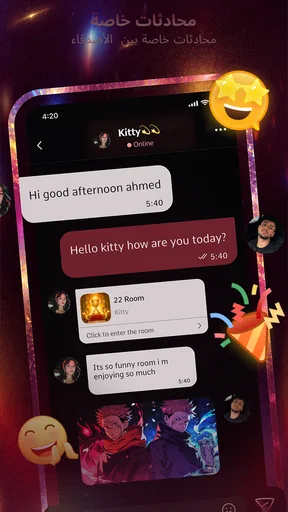


Our Review of Shaghaf Chat - شغف شات
 Analysis by Appyee
Voice chat changes the feeling of an online conversation. Instead of waiting for messages to be typed, people can speak in the moment, react naturally, and let a discussion develop with less friction. That is the central idea behind Shaghaf Chat, a free communication app from shaghaf Chat for people who want live voice conversations and the chance to meet new friends.
I found the app most interesting when I treated it as a place for spontaneous conversation rather than as a replacement for every messaging tool on my phone. Its focus is narrow, but that focus is useful: the experience is built around talking, listening, and joining a social atmosphere instead of composing carefully edited text. If you enjoy meeting people through conversation, that distinction matters.
The app is listed for Teen users and supports devices running Android 7.0 or later. It reached version 1.4.1, and its audience has grown beyond 10 thousand installs. Those figures suggest a developing community rather than a huge, established network, so the quality of the experience will depend heavily on when you open it and who happens to be active.
Live voice chat is the experience, not just an extra feature
Many communication apps include voice calls, but they still revolve around private messages, contact lists, or existing friendships. Shaghaf Chat takes a different direction by putting live voice interaction at the center. That makes the app feel closer to entering a social room than sending a message to someone you already know.
In practical terms, voice removes some of the effort that makes text conversations fade. I do not need to write a complete thought, wait for a reply, and decide whether the exchange is still active. A short comment, a laugh, or a quick change of subject can keep the conversation moving. That immediacy is the app’s strongest reason to exist.
The benefit is especially clear for users who find text-based introductions awkward. A written profile or opening message can make meeting strangers feel formal. Speaking gives a better sense of personality much sooner. It also makes casual conversation feel less like an application form and more like a normal social encounter.
At the same time, voice chat asks more from the user than text does. I need to be somewhere I can comfortably listen and speak, and I have to accept that conversations can be unpredictable. This is not an app I would open when I want a quiet, private, carefully controlled exchange. It is better suited to users who like a little spontaneity.
What the voice-first approach changes
The most important change is emotional speed. In text, a conversation can remain distant even when people exchange many messages. In a live voice setting, tone becomes part of the message. A friendly voice can make an introduction warmer, while hesitation or interruptions can reveal that a conversation is not a good fit much earlier.
That can save time, but it can also make the first few minutes more demanding. Someone who prefers to think before responding may feel more comfortable with a conventional messenger. I would not recommend switching to Shaghaf Chat simply because it is free; I would choose it because live speaking is the part of social communication that you actually want.
There is also a useful trade-off between discovery and control. The app’s purpose is connected to forming new friendships, so it can expose you to people outside your existing circle. That is more adventurous than contacting only saved friends, but it means you should enter conversations with sensible boundaries. Do not share personal details quickly, and leave any interaction that makes you uncomfortable.
How I would use it in an ordinary day
Imagine finishing work or school and wanting some company without arranging a formal call. With a normal messenger, I might scroll through old chats, send a message, and wait for someone to be available. With a voice-focused social app, the goal is different: I can look for a live conversation and participate when I have the time and energy.
That scenario works best when I set a small intention before opening the app. I might decide to spend a short break listening first, or join a conversation with the aim of meeting one interesting person rather than trying to build several friendships immediately. This prevents the experience from becoming aimless browsing and makes it easier to judge whether the community suits me.
Listening before speaking is one of the most practical habits for this kind of app. It lets me understand the tone of a conversation, notice whether people are respectful, and decide whether I want to contribute. That is more useful than entering every room or discussion with the expectation that it must become a friendship.
A second useful habit is to treat the first conversation as a test, not a commitment. I would avoid giving out a phone number, social profile, location, or other identifying information during an initial chat. The ability to meet new people is valuable only when it remains comfortable and safe.
Where it works better than ordinary messaging
Shaghaf Chat has an advantage over standard text messengers when the main goal is casual discovery. Apps such as WhatsApp or regular SMS are excellent when I already know who I want to contact. Their strength is dependable, direct communication with existing contacts. They are not primarily designed around entering a social space and finding a new voice to talk with.
Social networks can offer broader discovery, but they usually spread attention across posts, images, comments, and private messages. Here, the voice element gives the interaction a clearer purpose. I am not opening it mainly to browse a feed; I am opening it to participate in conversation.
Audio-focused community platforms may provide a similar feeling, but the smaller scale of this service can be both appealing and limiting. A less crowded network may feel easier to approach, especially for someone who dislikes enormous public communities. On the other hand, fewer active users can mean fewer suitable conversations at a particular moment.
That is why I would keep a normal messenger installed alongside it. Shaghaf Chat is not the best tool for sending a document, preserving a detailed written record, or making sure a specific person receives a message. Its value appears when the conversation itself is the destination.
The everyday friction you should expect
The biggest limitation is the dependence on participation. A voice-chat app cannot create a lively experience by itself. If the people available at the time are not interesting, respectful, or compatible with your mood, the central feature loses much of its appeal. The install count indicates an early-stage audience, so I would expect the social experience to vary rather than feel equally active every time.
Voice also introduces practical problems that text avoids. Background noise can make a conversation tiring. A user may speak too loudly, interrupt, or leave long pauses. Even without technical trouble, different conversation styles can clash. Someone looking for calm one-to-one discussion may not enjoy a busy social environment, while an outgoing user may find a quiet session disappointing.
Privacy deserves deliberate attention because speaking can reveal more than typed words. Accent, surroundings, age clues, and personal stories can all expose information unintentionally. I recommend using voice chat in a neutral setting, avoiding identifiable background details, and keeping the first exchanges general. These are not reasons to avoid the app; they are sensible rules for any service centered on meeting strangers.
The Teen content rating also makes it important for younger users to approach conversations carefully and for families to discuss online boundaries. A rating does not replace judgment. Users should understand that a friendly conversation can still involve someone they do not know, and they should never feel pressured to move a chat elsewhere or reveal private information.
Costs and the question of commitment
The app is free to install, which makes trying the voice-chat concept easy. There are in-app purchases ranging from $0.99 to $204.99 per item, so I would check each purchase screen carefully before spending anything. The free entry point is helpful, but it should not be confused with an experience where every optional element necessarily costs nothing.
My advice is to use the free experience long enough to decide whether the available conversations are genuinely useful to you. Do not buy anything merely because you feel invested in a new social connection or because a conversation suggests that spending is expected. A good voice-chat experience should remain enjoyable without pressure.
I would also avoid judging the service solely by its average rating of 3.6 from roughly 220 ratings. That number gives a quick impression, but voice communities are unusually personal: one user may value lively discovery while another may dislike the same unpredictability. The more useful question is whether you want live social interaction and whether the current community matches your communication style.
Who gets the most from this app
The best fit is someone who enjoys spontaneous conversation, wants to meet people beyond an existing contact list, and is comfortable speaking with unfamiliar users. It can also suit a person who finds text introductions too slow or impersonal. If you like listening first and joining a conversation when it feels right, the voice-first design may feel refreshingly direct.
It is less suitable for users who need a reliable way to reach a particular friend, keep searchable written records, or communicate quietly in public places. I would also suggest skipping it if you strongly dislike unexpected social interaction. A conventional messenger will be better when control, privacy, and predictability matter more than discovery.
Another good match is the user who can manage their own boundaries. That means leaving conversations without apology, declining requests for personal information, and resisting pressure to make a connection more private or more expensive than intended. The app can open the door to new friendships, but the user still has to decide which doors are worth entering.
For someone trying it for the first time, I would begin with short sessions. Listen to the atmosphere, notice how people treat newcomers, and decide whether the conversations feel natural rather than forcing yourself to stay. If the community feels welcoming, return at a time when you can speak without distractions. If it feels noisy or uncomfortable, that is a meaningful result, not a failure on your part.
My recommendation after using the voice-first idea
Shaghaf Chat has a clear identity: it is a communication app built around live voice interaction and meeting new people. That focus gives it more personality than a basic text messenger, especially for users who believe that tone and spontaneity make conversation better. I like that it encourages participation instead of endless message drafting.
Still, I would approach it as a developing social space rather than a complete communication replacement. The audience may not be equally active at every moment, and the voice format demands more attention, confidence, and privacy awareness than typing. The purchase range also means I would stay cautious around optional spending.
My final view is straightforward: try it if you want casual voice conversations and are willing to explore a changing community with sensible boundaries. Keep your usual messaging app for dependable contact with people you already know. Shaghaf Chat is most convincing when you want the conversation itself to be the activity, not when you simply need another inbox.
Developed by shaghaf Chat and currently offered free, it is an easy app to test for Teen users on compatible Android devices. I would recommend giving it a fair trial during a relaxed moment, listening before speaking, and judging it by the quality of the interactions you actually find. If those conversations make meeting new people feel more natural, the app has a worthwhile place in your communication routine.
Verdict
Strengths of Shaghaf Chat - شغف شات
- Arabic-focused interface makes conversations feel natural for local users.
- Simple design helps new users start chatting without a steep learning curve.
- Supports meeting people with shared cultural and language interests.
- Chat-based format encourages quick, casual interactions.
- Lightweight experience is suitable for users with modest device resources.
Limitations of Shaghaf Chat - شغف شات
- Public chat environments may expose users to inappropriate or unwanted messages.
- The quality of conversations can vary significantly between users and rooms.
- Limited activity may be noticeable outside peak usage hours.
- Users should carefully review privacy settings before sharing personal details.
- Some features or content may depend on an active internet connection.
Similar Picks in This Category
View All
Google Messages
Google LLC4.6

Gmail
Google LLC4.1

Google Meet
Google LLC4.4

Google Chrome
Google LLC4.1

WhatsApp Messenger
WhatsApp LLC4.6

Carrier Services
Google LLC4.2
Frequently Asked Questions
What is Shaghaf Chat - شغف شات and what can I use it for?
Shaghaf Chat - شغف شات is a social communication app designed for meeting and chatting with other users, with an emphasis on Arabic-speaking communities. After installing it, users can typically create a profile, browse available conversations or rooms, and exchange messages. The exact features may vary by version, region, and account status, so it is worth checking the current app description and permissions before registering.
Is Shaghaf Chat - شغف شات free to download and use?
The app may be available as a free download, but some features can require in-app purchases, subscriptions, virtual credits, or other paid options. Basic access and messaging may differ depending on the current version and the developer’s policies. Before spending money, review the pricing information shown inside the app, including renewal terms, refund rules, and whether optional purchases are clearly identified.
Do I need to create an account or provide personal information?
Most social chat applications require some form of registration so they can create a profile and connect conversations to a user. Shaghaf Chat may request information such as a display name, phone number, email address, age, profile photo, or location-related details, depending on the sign-up method. Only provide information you are comfortable sharing, and read the privacy policy before completing registration.
Is Shaghaf Chat - شغف شات safe for children and teenagers?
Parents should not assume that a public chat app is suitable for children simply because it is easy to download. Conversations may involve strangers, mature language, unwanted messages, or requests for personal information. Check the store’s age rating and the app’s community rules, enable available privacy and blocking controls, and supervise younger users. Never share passwords, precise location, financial details, or private photos.
What should I do if I encounter spam, harassment, or a suspicious profile?
If another user behaves abusively, sends unwanted content, or asks for money or sensitive information, stop communicating and avoid clicking unfamiliar links. Use the app’s report, block, or mute tools if they are available, and keep evidence such as screenshots when appropriate. Serious threats, exploitation, or fraud should also be reported to the relevant platform, local authorities, or a trusted adult.
